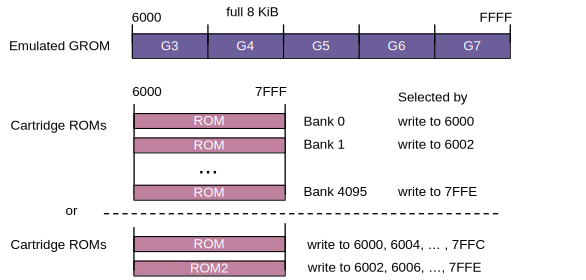
Several types of printed circuit boards are used for TI cartridges. In RPK and ZIP style cartridge images, they are referenced by their type name.
Standard
This type is used for most classic cartridges.

Cartridges may have 0 to 5 GROMs; their contents have to be dumped contiguously from the first GROM to the last. If the dump file is less than 40 KiB long, the remaining locations in the GROM space are filled with 00.
The cartridge may contain ROM, which must be dumped as one contiguous file. Here as well, remaining locations are filled with 00.
Original TI cartridges always have at least one GROM and possibly a ROM. Third-party cartridges were usually built without GROMs, but these cartridges are locked out in later consoles like in the TI-99/QI. This was in fact an attempt of Texas Instruments to block third-party cartridge development.
Write operations to the GROM and ROM spaces are ignored.
Extended Basic style (paged)
This format is used mainly for Extended Basic. Later formats took this format as a base.

Similar to the standard format, there may be 0 to 5 GROMs. In this case, there are two ROM banks that are selected by a write operation into the ROM space. This leaves the contents unchanged, but switches the banks. The written value is arbitrary.
In fact, the actual ROMs in the Extended Basic cartridge are organized in a different way: There is one 4 KiB ROM that occupies the range from 6000 to 6FFF, and an 8 KiB ROM consisting of two 4 KiB banks that are visible in the area from 7000 to 7FFF. The write operation just switches the banks in this second area.
In ZIP cartridges, this PCB type is named paged12k. In RPK cartridges, the paged type should be used. The first bank is mounted in the rom_socket, while the second bank is mounted in the rom2_socket.
Mini Memory (minimem)
The Mini Memory cartridge contains one GROM and a 4 KiB ROM. The second half of the ROM space is used by NVRAM.

The NVRAM is buffered by a battery in the cartridge. In MAME, the NVRAM contents are stored in a file in the nvram path and loaded on the next run.
The full GROM space is available, but the only cartridge to use this type is Mini Memory with a single GROM.
Super Space II (super)
The Super Space II cartridge is an Editor/Assembler cartridge with additional RAM of 32 KiB capacity. The RAM is visible as four banks of 8 KiB each, which are mapped into the ROM space by setting a CRU bit.
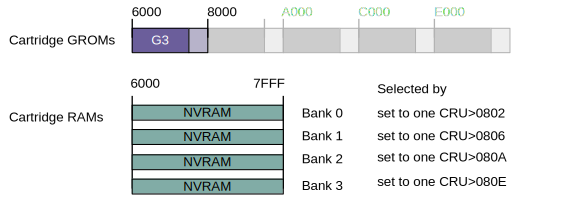
The base address is 0800, so the bits to be set are 1, 3, 5, and 7 (yielding twice the offset, so 0802, 0806 etc.). This may also be achieved by writing the values 02, 08, 20, and 80 to CRU address 0800 with LDCR.
If there is a valid ROM header at the memory address 6000, the name in the header will be shown in the cartridge selection list.
MBX cartridges (mbx)
Cartridges from MB (Milton Bradley) may have a special PCB type inside, which is called "MBX".
The GROM space may be populated by 0 to 5 GROMs as with other PCB types. The ROM space, however, is a bit unique:
There is a ROM of up to 16 KiB size, which is mapped into the space from 7000 to 7FFF as one of 4 banks of 4 KiB each. The bank is selected by writing the bank number into address 6FFE. In the space from 6000 to 6FFF, bank 0 is always visible. Also, there may be 1 KiB of buffered RAM located at 6C00 to 6FFF, shadowing the ROM.
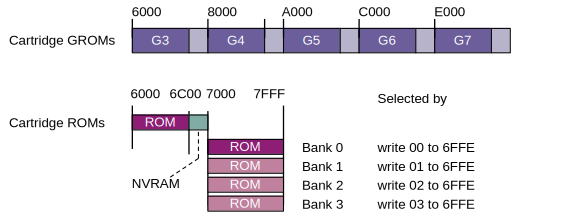
Note that MBX cartridges may rely on additional hardware that is not (yet) available in the MAME emulation. That is, the cartridge may be correctly set up, but fails to start because the hardware is not detected.
Paged7 (paged7)
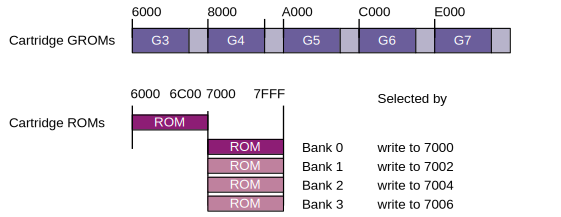
This is a rare format, used by TI CALC, maybe by others as well. It is similar to the MBX scheme, but without the RAM. Also, the banks are switched by writing any value to 7000, 7002, 7004, or 7006.
The ROM may take up to 16 KiB, available as one of 4 banks of 4 KiB each, and bank 0 is always visible at 6000 to 6FFF.
Paging by CRU (pagedcru)
Cartridges with this type of PCB make use of CRU bits to select one of 8 banks (total of 64 KiB). In fact, they work like the Super Space II cartridge, but without a GROM.

One way to select a bank is to make sure that no other bank is currently selected, then use the SBO (set bit to one) instruction:
   LI   R12,>0800
   SBO  1
This turns on bank 0. However, it is recommended to use the LDCR instruction which sets or clears multiple CRU bits in a row so that it is ensured that only one bank is actually selected.
   LI   R12,>0800
   LI   R1,>0080    // 0 0 0 0 0 0 0 0 1 0 0 0 0 0 0 0  = Bank 3
   LDCR R1,0        // 0 means 16
Paging by 74LS379 (paged379i)

Paging by 74LS378 (paged378)

Paging by 74LS377 (paged377)

GROM emulation (gromemu)