
The TI-99/4A emulation offers two kinds of cartridge formats:
- the common ZIP format for ROM packages in MAME
- the RPK format
The first format is used throughout MAME for bundling ROM dumps that belong to some collection, for example, all ROMs for a computer system. In the same way, all ROMs of a cartridge are stored in a single ZIP file, which must be added to the software list, a XML file in the hash subdirectory. For the TI, this would be the file ti99_cart.xml.
The second format was the result of an earlier attempt to find a format for cartridges. Later, the ZIP format became the recommended format for cartridges, but it has a shortcoming: It depends on an update of the mentioned XML file. The RPK format, on the other hand, allows the user to set up a self-contained cartridge package that can be used right away. For this reason, the RPK format was kept in MAME.
Basic concept of a MAME cartridge
A cartridge consists of a printed circuit board (PCB) and some memory circuits mounted on it. A few cartridges may also have additional features like switches, but these are currently not emulated.
In order to emulate the cartridge, we need the contents of the memory circuits and the type of the PCB. Although the PCB may theoretically contain any kind of circuitry, there are only about a dozen different types. All these PCBs are already emulated inside MAME, so we just need to declare which one to choose by name. We have to point out that if a PCB has a different design, this cannot be used in MAME until it is implemented and added to the emulation.
The RomPacK file (RPK)
The cartridge contents and the definition of the PCB are put together as a RPK file (RomPacK).
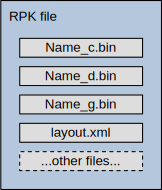 The RPK file contains several files with dumps of the ROMs and GROMs, an XML file named "layout.xml", and possibly some more files for documentation or other uses. The RPK file is actually a ZIP archive, with the suffix changed to "rpk". This suffix (instead of zip) should also remind you to not unpack the file. The RPK file is provided to MAME unchanged and not unpacked.
The dump files cover the contents of the GROMs and the ROMs. Their names may be freely chosen, the layout.xml file determines the role of the file. Still, there is some convention for the naming of the dump files which will be described below.
GROM dump
The GROM dump spans the whole GROM cartridge space, which reaches from G>6000 to G>FFFF (40 KiB). Each real GROM offers 6 KiB of memory; the remaining 2 KiB are not usable (combination of other contents, see the entry on Ninerpedia). The dump, however, must also contain these unusable bytes so that all good locations properly line up in memory, except for the last part. As you see below, this dump contains GROM3 to GROM5. All bytes after G>B7FF are filled with 00.
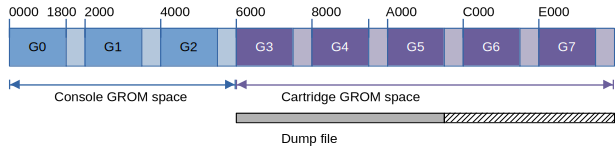
The TI-99/4A console does support multiple banks of GROMs, but they are not used in cartridges. Expansion cards like the HSGPL actually support these banks, but they use a different way of storing the cartridge contents.
The dump file is traditionally named like XXXXg.bin, where XXXX is the cartridge name and "g" indicates a GROM dump. This naming is not required in MAME's RPK format because the meaning of the dump file is defined in the layout.xml file. However, to ensure compatibility with other emulators, this naming scheme is still recommended.
ROM dump
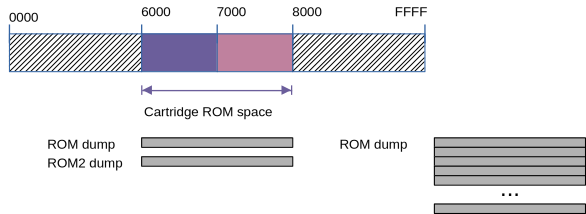
The cartridge ROM space is located at addresses >6000 through >7FFF. A ROM dump contains these bytes; if fewer are stored, the remaining space is filled with 00.
Classic cartridges: The ROM dump is either a single bank of ROM from >6000 to >7FFF (8 KiB), or two banks of 8 KiB each. The second bank, if available, is called a ROM2 dump. By writing to a location of the cartridge space, one of the two banks are selected (6000, 4, 8, ... = bank 0; 6002, 6, A, ... = bank 1).
Extended Basic is an example of this scheme, also AtariSoft cartridges.
The naming scheme for dump files is XXXXc.bin for the ROM dump, and XXXXd.bin for the ROM2 dump.
New cartridges: With higher capacity ROMs, various banking schemes are applied (see the PCB types below) to map a chunk of 8 KiB into the window from >6000 to >7FFF. For these types, the ROM2 dump is not available. Many of today's cartridges make use of banked ROMs.
RAM in cartridges
Some cartridges contain RAM, which may be buffered or unbuffered. In the buffered case, the contents are kept after turning off the console, otherwise they are lost. In MAME, both kinds of RAM are available, where the buffered RAM is treated as NVRAM (non-volatile RAM, saved on exit and restored on restart).
One example is Mini Memory. It offers one GROM, one ROM (4 KiB), and one buffered RAM (4 KiB).

There are no special RAM dump files; instead, MAME stores NVRAM contents in the nvram_directory path.
Persistent (buffered) RAM is indicated by the "persistent" value of the type attribute. When the attribute is missing or contains a different value, the RAM is not buffered.
Sockets
The contents of the dumps were once taken from circuits on the PCB of the cartridge. To make them accessible again, MAME declares sockets where these contents are read from.
- grom_socket: Contains the GROM dump
- rom_socket: Contains the ROM dump
- rom2_socket: Contains the ROM2 dump
- ram_socket: Contains a buffered or unbuffered RAM.
In the layout.xml file, the sockets refer to the previously declared resources (dump) by their "uses" attribute:
<rom id="gromimage" file="phm3058g.bin"/><socket id="grom_socket" uses="gromimage"/>
The RAM resource declares the NV file name, size, and kind of RAM:
<ram id="cartram" type="persistent" file="minimem.nv" length="4096" />
PCB types
The following table shows the possible values for the PCB type in the layout.xml definition. In many cases of recent cartridges, the gromemu type is an appropriate choice.
| PCB Type | Meaning | Maximum size | Sockets | Used by |
| standard | Cartridges with 0 or 1 ROM dump and 0 or 1 GROM dump. | 8K + 40K | rom_socket, grom_socket | Most classic cartridges |
| paged | Cartridges with 2 ROMs and 0 or 1 GROM dump. | 8K + 8K + 40K | rom_socket, rom2_socket, grom_socket | Extended Basic, Atarisoft |
| minimem | Cartridges with 1 ROM (4K) and 1 persistent RAM (4K) and 0 or 1 GROM dump. | 4K + 40K | rom_socket, grom_socket, ram_socket | Mini Memory |
| super | Cartridges with 1 RAM (32K) and 0 or 1 GROM dump. | 40K | grom_socket, ram_socket | SuperSpace II |
| mbx | Cartridges with 1 ROM, 1 RAM (1K, persistent) and 0 or 1 GROM dump. | 4*4K + 40K | rom_socket, grom_socket, ram_socket | MBX cartridges |
| paged7 | Cartridges with 1 ROM and 0 or 1 GROM dump, selection at 7000 | 4*4K + 40K | rom_socket, grom_socket | TI-CALC |
| pagedcru | Cartridges with one ROM, bank selection by CRU bits | 8*8K | rom_socket | DataBioTics cartridges |
| paged379i | Cartridges with one ROM, bank selection by LS379 (inverted) | 16*8K | rom_socket | New cartridges |
| paged378 | Cartridges with one ROM, bank selection by LS378 | 64*8K | rom_socket | New cartridges (GROM not yet supported) |
| paged377 | Cartridges with one ROM, bank selection by LS377 | 256*8K | rom_socket | New cartridges |
| gromemu | Cartridges with 1 ROM and GROM emulation | 4096*8K + 40K | rom_socket, rom2_socket, grom_socket | RXB and other cartridges with emulated GROMs |
GROM Emulation
Third-party cartridges usually do not use original TI GROM circuits, including classic and recent cartridges. Instead, a special circuit emulates the GROM behavior by accepting a start address, and then delivering bytes starting from the current address. The actual memory is a normal (EP)ROM which gets the address from this circuit.
This has several observable effects:
- The emulated GROM is faster. While the real GROM relies on a fairly slow clock (delivered by the video processor), the emulated GROM offers almost full EPROM speed.
- The emulated GROM may span the whole available GROM space, beyond the 8 KiB of a real GROM. Hence, the cartridges do not contain multiple emulated GROMs but only one ROM with the addressing circuit that plays the GROM part.
- Not surprisingly, the emulated GROM makes use of the whole address space, unlike the real GROMs that offer only 6 KiB in every 8 KiB window.
- Also, the emulated GROM does not wrap the address at 8 KiB boundaries.

All this is available in MAME by the PCB type gromemu. If the real cartridge uses such a GROM emulation, it will very likely only work with this type, regardless of the actual size of the dump. The reason is that the specific GROM features (like the wrapping) may not be part of the real cartridge.
Over time, the gromemu type became the catch-all for cartridges whose actual addressing circuitry is unclear or unknown, and for cartridges with very high capacities. Thus the gromemu type offers up to 4096 pages of 8 KiB each, which sums up to an impressive 32 MiB.
The gromemu type also supports the 2-bank Extended Basic layout, but here again, the ROM dumps are limited to 8K+8K.
The layout.xml file
The layout.xml file is a XML document with the <romset> element at the root level. There are two children named <resources> and <configuration>. The <resources> element contains one or more <rom> elements and possibly a <ram> element.
The <rom> elements link to the dump files in the RPK file by citing their file name in the file attribute. The id attribute defines the key by which the resource is referred to in a <socket> element 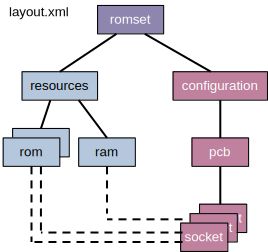 in the <configuration> part.
The configuration part defines the PCB that is used in the cartridge. The PCB contains several socket elements, each one referring to a resource element (rom or ram). Other elements are not used in the TI cartridges.
For illustration, I'll give some examples with increasing complexity below.
Hunt the Wumpus (Simple GROM cartridge)
<?xml version="1.0" encoding="utf-8"?> <romset version="1.0"> <resources> <rom id="gromimage" file="phm3023g.bin"/> </resources> <configuration> <pcb type="standard"> <socket id="grom_socket" uses="gromimage"/> </pcb> </configuration> </romset>
The GROM dump is contained in the phm3023g.bin file. It is 8192 bytes long, so it contains G3 only (including the forbidden 2 KiB).
TI Invaders (Simple GROM+ROM cartridge)
<?xml version="1.0" encoding="utf-8"?> <romset version="1.0" listname="invaders"> <resources> <rom id="gromimage" file="phm3053g.bin"/> <rom id="romimage" file="phm3053c.bin"/> </resources> <configuration> <pcb type="standard"> <socket id="grom_socket" uses="gromimage"/> <socket id="rom_socket" uses="romimage"/> </pcb> </configuration> </romset>
ROM dump (phm3053c.bin) and GROM dump (phm3053g.bin) are 8 KiB long.
Mini Memory (GROM + ROM + NVRAM)
<?xml version="1.0" encoding="utf-8"?> <romset> <resources> <rom id="gromimage" file="phm3058g.bin"/> <rom id="romimage" file="phm3058c.bin"/> <ram id="bufferedRam" type="persistent" file="minimem.nv" length="4096" /> </resources> <configuration> <pcb type="minimem"> <socket id="rom_socket" uses="romimage"/> <socket id="grom_socket" uses="gromimage"/> <socket id="ram_socket" uses="bufferedRam"/> </pcb> </configuration> </romset>
We have a GROM and a ROM dump, and there is also a RAM that is made persistent in the minimem.nv file. If your nvram_directory setting in mame.ini is "nvram", and you are using the ti99_4a driver, the file is stored in nvram/ti99_4a/minimem.nv.
Pole Position (ROM + ROM2)
<?xml version="1.0" encoding="utf-8"?> <romset version="1.0" listname="polepos"> <resources> <rom id="romimage1" file="poleposc.bin"/> <rom id="romimage2" file="poleposd.bin"/> </resources> <configuration> <pcb type="paged"> <socket id="rom_socket" uses="romimage1"/> <socket id="rom2_socket" uses="romimage2"/> </pcb> </configuration> </romset>
We have two ROM dumps here (each 8 KiB), named poleposc.bin and poleposd.bin.
Pinball (74LS378 selector)
<?xml version="1.0" encoding="utf-8"?> <romset version="1.0"> <resources> <rom id="romimage" file="pinball99-8.bin"/> </resources> <configuration> <pcb type="paged378"> <socket id="rom_socket" uses="romimage"/> </pcb> </configuration> </romset>
The ROM dump file pinball99-8.bin is 256 KiB long, which means it contains 32 ROM banks of 8 KiB length. ROM dumps for the 378 selector circuit are usually named like XXXX8.bin.
Note that the 378 selector can at most handle 64 banks of 8 KiB each, so the maximum size of ROM dumps for the paged378 type is 512 KiB.
Creating the RPK file
This was the hard part. Now you are ready to pack your RPK:
- Create a ZIP file containing all dump files and the layout.xml file.
- Rename the ZIP to XXXX.rpk (where XXXX is desired name of the package)
